
You can opt in to the new Camplify owner experience right now from the web. The app version is coming, and until then you can toggle freely between the new experience and the classic dashboard while you settle in.
New Experience Insights- The new experience is live on web now, with the app version to follow.
- Owners can switch between the new experience and classic at any time, for now.
- The classic experience becomes unsupported from 1 October 2026.
- Analytics and Campaigns are two new features exclusive to Premium Members.
A new side navigation. The left-hand menu has been introduced to help you jump between your key management pages, whether that's your listings, your Calendar, or your Bookings, without hunting through sub-menus.
Notifications Centre: We have refreshed the owner notification centre. You will now see alerts and updates for everything happening across your bookings and listings. Your Notification Centre now flags updates by urgency. Red notifications are urgent and failing to action them may impact your payment processing. Yellow notifications relate to your account. Blue notifications cover your booking and messaging activity.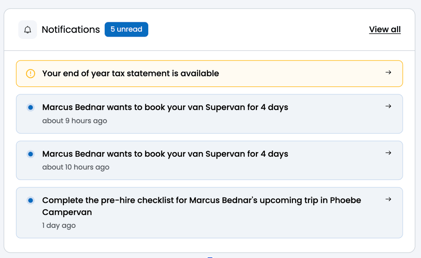
Earnings and Tax Statements now live on one page. You no longer need to jump between two separate sections to check your income and pull your tax reporting together.
Bookings has been split in two. 'My Trips' shows your view as a hirer if you also hire other members' vans, while 'Bookings' continues to show the booking activity across your own listings.
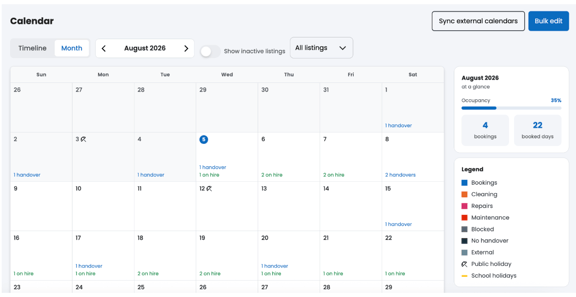
The new Calendar allows you to manage availability and pricing in one place.
We’ve rebuilt the Calendar in your account so it’s faster to update, more flexible, and gives you a lot more control over your listing(s), whether you manage one van or a whole fleet.
What’s new at a glance
- A clearer view of your calendar: switch between a timeline (see all your listings at once) and a month view (focus on one listing at a time)
- Bulk editing: update availability, pricing, minimum stay, and cancellation policy across multiple dates and multiple listings in one go
- Recurring weekday edits: for example, block every Friday and Saturday for the next three months in a single action
- Calendar sync: connect external calendars via iCal so those dates are automatically blocked in your Camplify calendar, and export your Camplify calendar to other calendar services like Google Calendar so you can view all your activity where you need it
- At a glance statistics: occupancy rate, booked days, available days, and blocked days per month across your listings
Read more in our account management guide.
Send Quote turns pre-booking messages into bookings. If a hirer messages you before submitting a booking request, you can now reply with a pre-filled quote covering their dates, hire type and guest numbers. If they accept, the request is auto-approved and moves straight to the payment step, no manual approval needed on your end.
Pro-tip: switch over sooner rather than later. Any new feature Camplify rolls out from here will only be available on the new experience, so getting familiar with it now means you won't be caught out when classic retires.
How to Opt In- Log in to your Camplify account.
- Open the user menu in the top right corner of the screen.
- Select 'Try the new experience' from the dropdown.
- Explore your new left-hand navigation, Calendar, and Notification Centre.
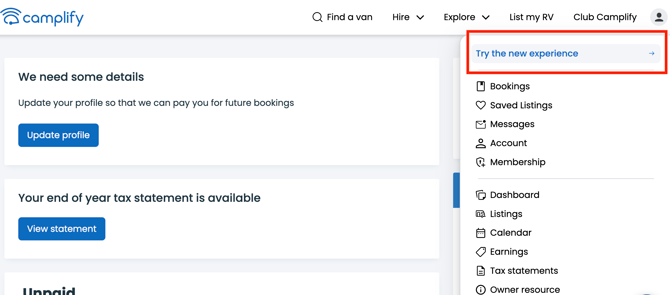
You can do this from anywhere on the platform as long as you're logged in.
Premium Member Features- Analytics - monitor your overall performance as an owner as well as how each individual listing is performing, including listing views. Read more in our Analytics for owners guide.
- Campaigns - send messages and offers to past hirers to encourage them to rebook with you. Read more in our Campaigns guide.
Not a Premium Member yet? You can upgrade your account from your Membership page to unlock both.
Key new dashboard questions:Do I have to switch to the new dashboard straight away? No you have time however the classic experience becomes unsupported from 1 October 2026
I have questions the article hasn't answered, who do I contact? Reach out to the Camplify team directly if you need help with your new dashboard.